
TickBoy · powered by Claude
Your AI trading agent for MetaTrader 5.
Tell TickBoy what you want, typed or spoken: he reads your chart, works the platform and acts after your Yes. Switch on Sentient mode and he trades on his own, inside your limits.
 (opens in a new tab)
- Windows
- MetaTrader 5
Trading forex and CFDs carries a high risk of losing money quickly because of leverage. TickBoy is a tool, not financial advice. Try it on a demo account first, and Sentient mode in Shadow first.

The agent
He reads, answers and acts.
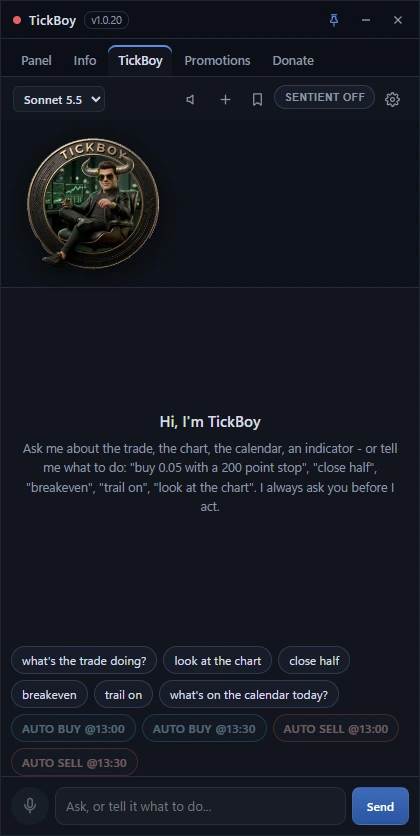
His brain is Claude by Anthropic. He reads the panel with every message, answers about the trade, the chart, the calendar or an indicator, and carries out what you ask through 35 tools, after your Yes. Just tell him:
- “buy 0.05 with a 200 point stop”
- “close half”
- “breakeven”
- “trail on”
- “look at the chart”
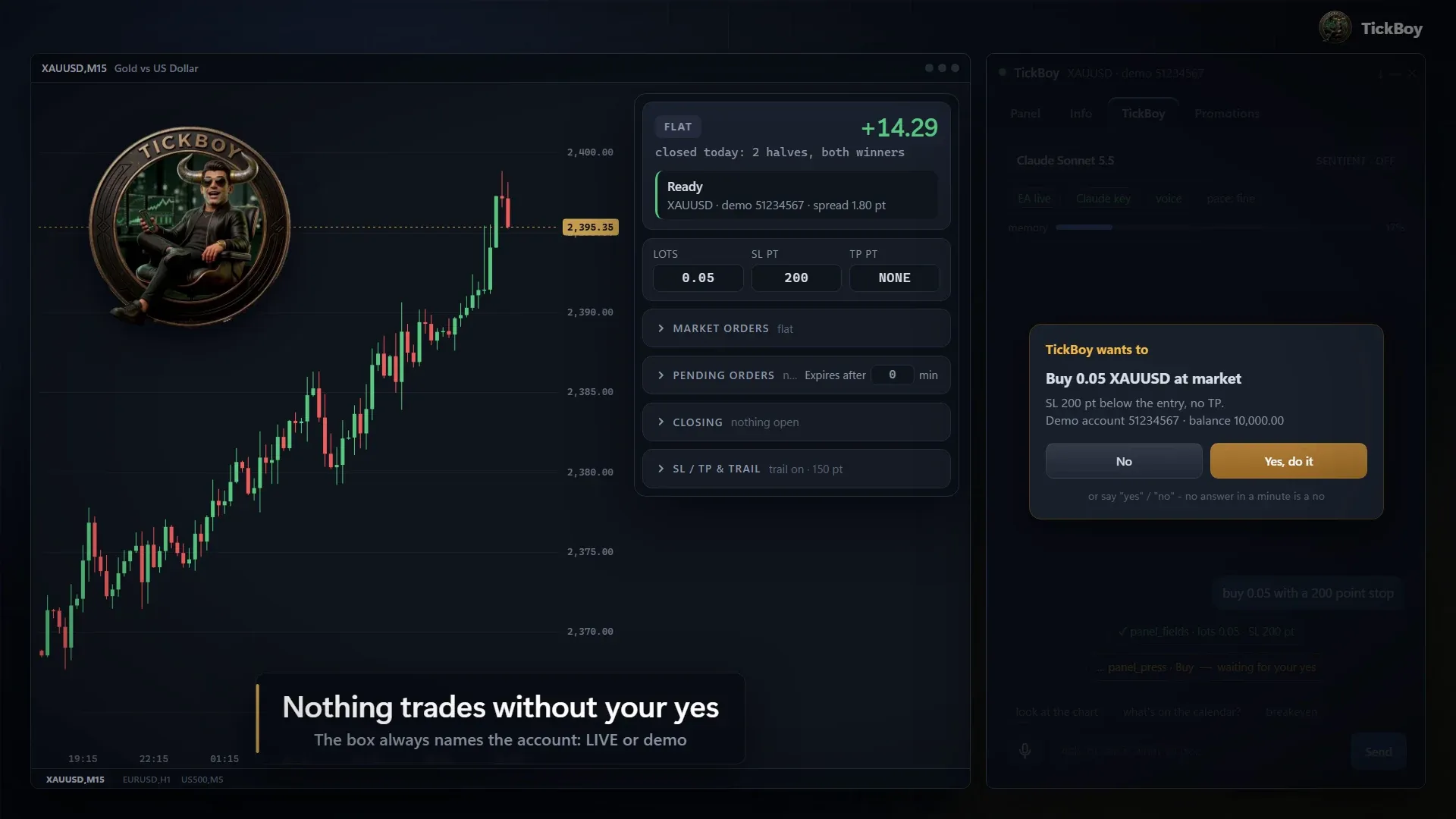
From your words to a placed trade
Type or say “buy 0.05 with a 200 point stop”. He prepares the order and shows it in the yes box, which names the account and whether it is LIVE (real money) or demo. On your Yes, it is placed.
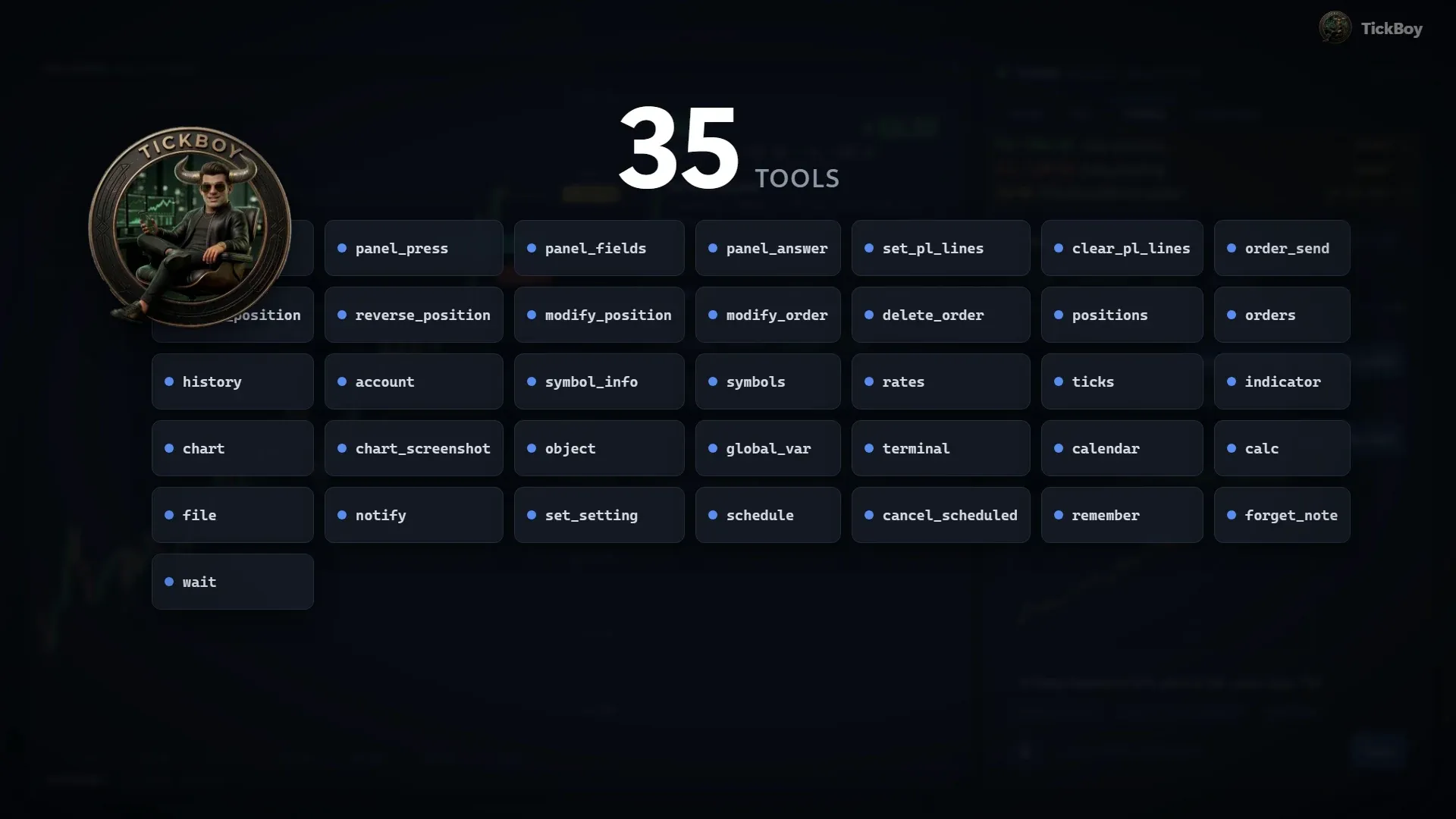
35 tools across MetaTrader 5
Orders and positions, history, account, symbol info, prices and ticks, indicators, the economic calendar, chart screenshots he looks at, chart objects, alerts, settings, scheduling and a notebook.
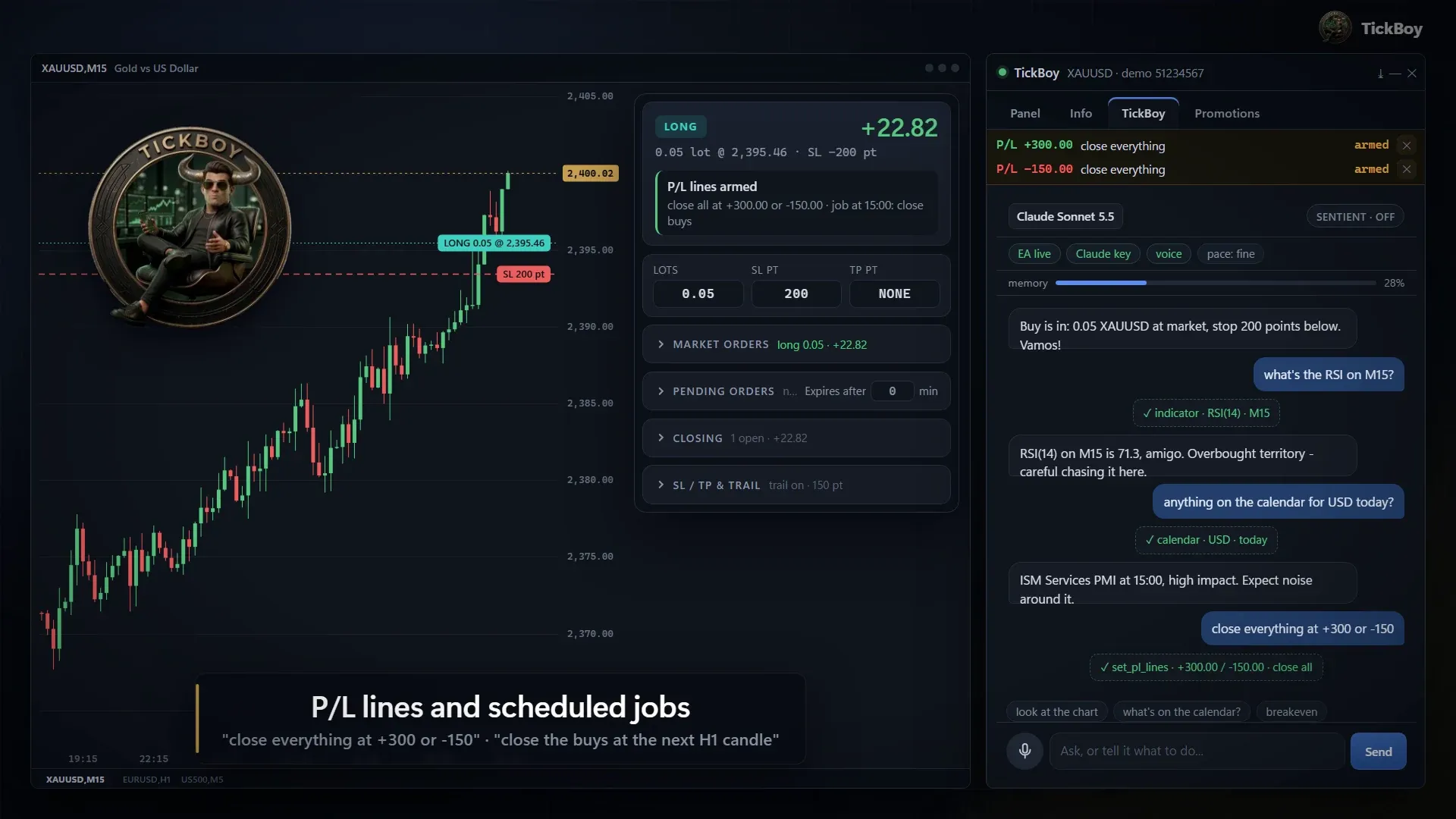
He answers, then he sets the job
Ask about the trade, the chart, the calendar or an indicator. Then tell him “close everything at +300 or -150”, or “close the buys at the next H1 candle”: he shows you the job first, and on your Yes the panel carries it out.
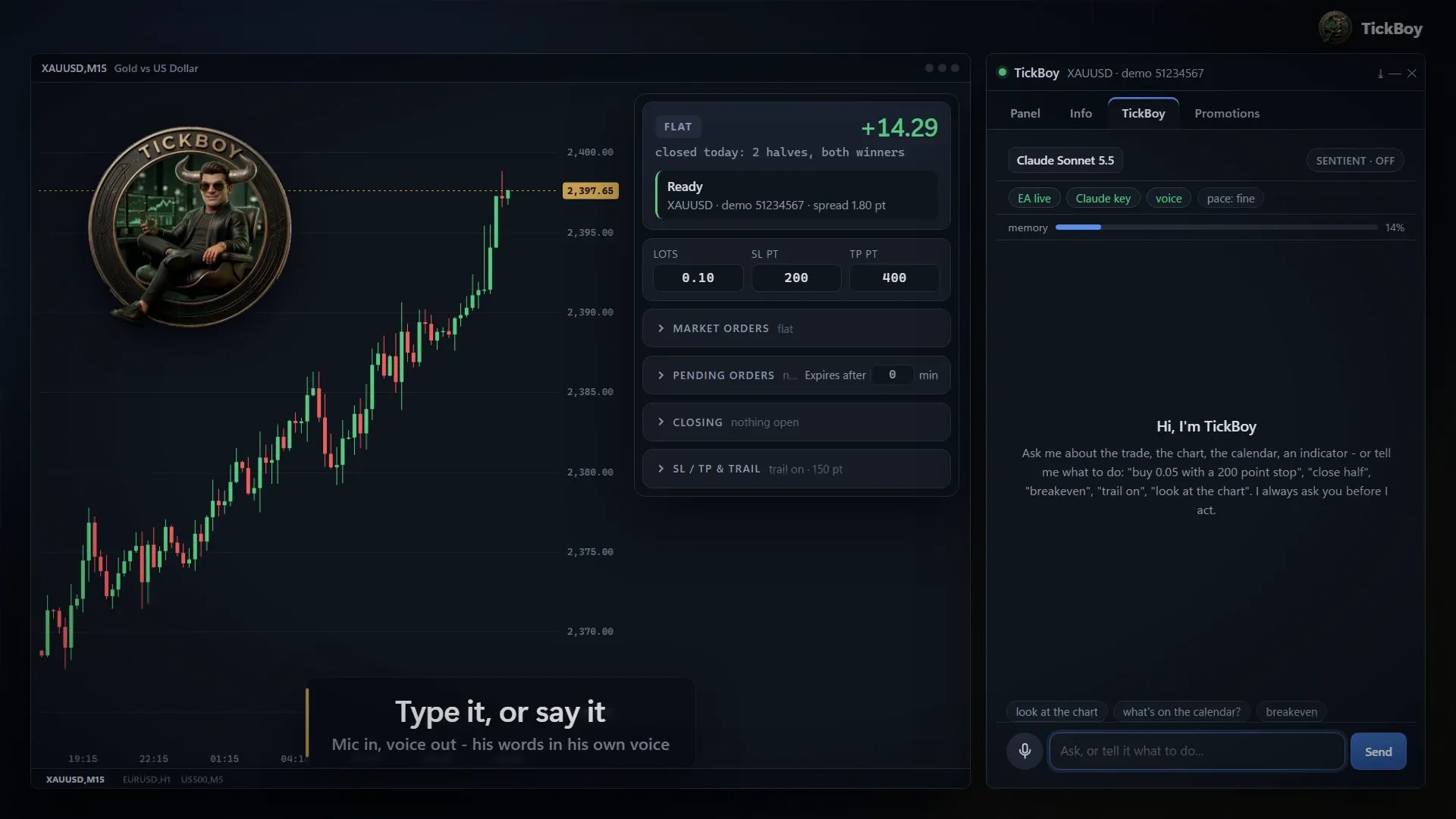
Type it or say it
A mic button for voice, and spoken replies in his own voice. Voice needs an optional ElevenLabs key.
He remembers, and watches your pace
His notebook keeps the rules and preferences you tell him, from one chat to the next, and he speaks up when the trading gets too fast. The app docks into a MetaTrader chart window, so it moves and tiles like any chart.

-
Buy is in. Vamos!
-
Buy limit placed. We wait for the dip.
-
Hedged. The position is locked, both sides.
-
Winners closed. Profit in the pocket.
-
Stop moved to breakeven. No more risk on this one.
-
The broker said no. The status line shows why.
He talks back
More than 160 recorded voice lines for over 100 events: panel actions, his jobs and Sentient mode. They are recorded, so alerts cost nothing to play. On screen he idles, reacts when you hover and click, and lip-syncs his lines.
Claude by Anthropic
Models
- Sonnet 5.5 · default
- Haiku
- Opus
- Fable
Connect with
- Your own Claude API key
- Your own Claude subscription
Or a local model through Ollama
The brain: Claude by Anthropic
Claude Sonnet 5.5 is the default; Haiku, Opus and Fable can be picked. Connect your own Claude API key, or sign in with your own Claude subscription. Local models through Ollama are an option too.
Sentient mode
When you step back, he steps in.
- Off by default
- Shadow first
- Live when he has earned it
- Stop now any time
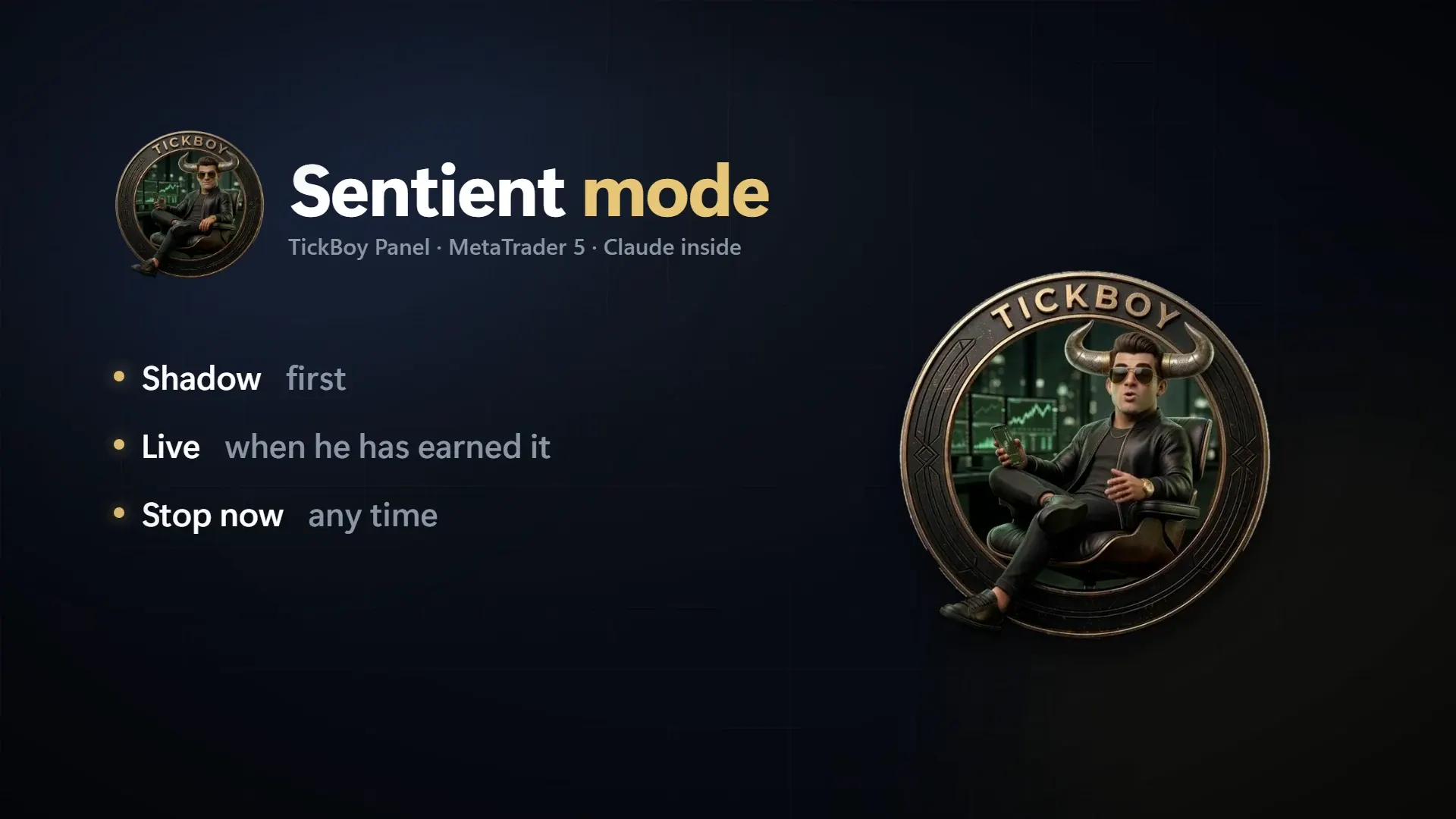
The one exception to asking first
And you switch it on yourself. TickBoy trades on his own, on a clock, with his own trades only, inside limits you set. It is Off by default and Off again every time the app starts.
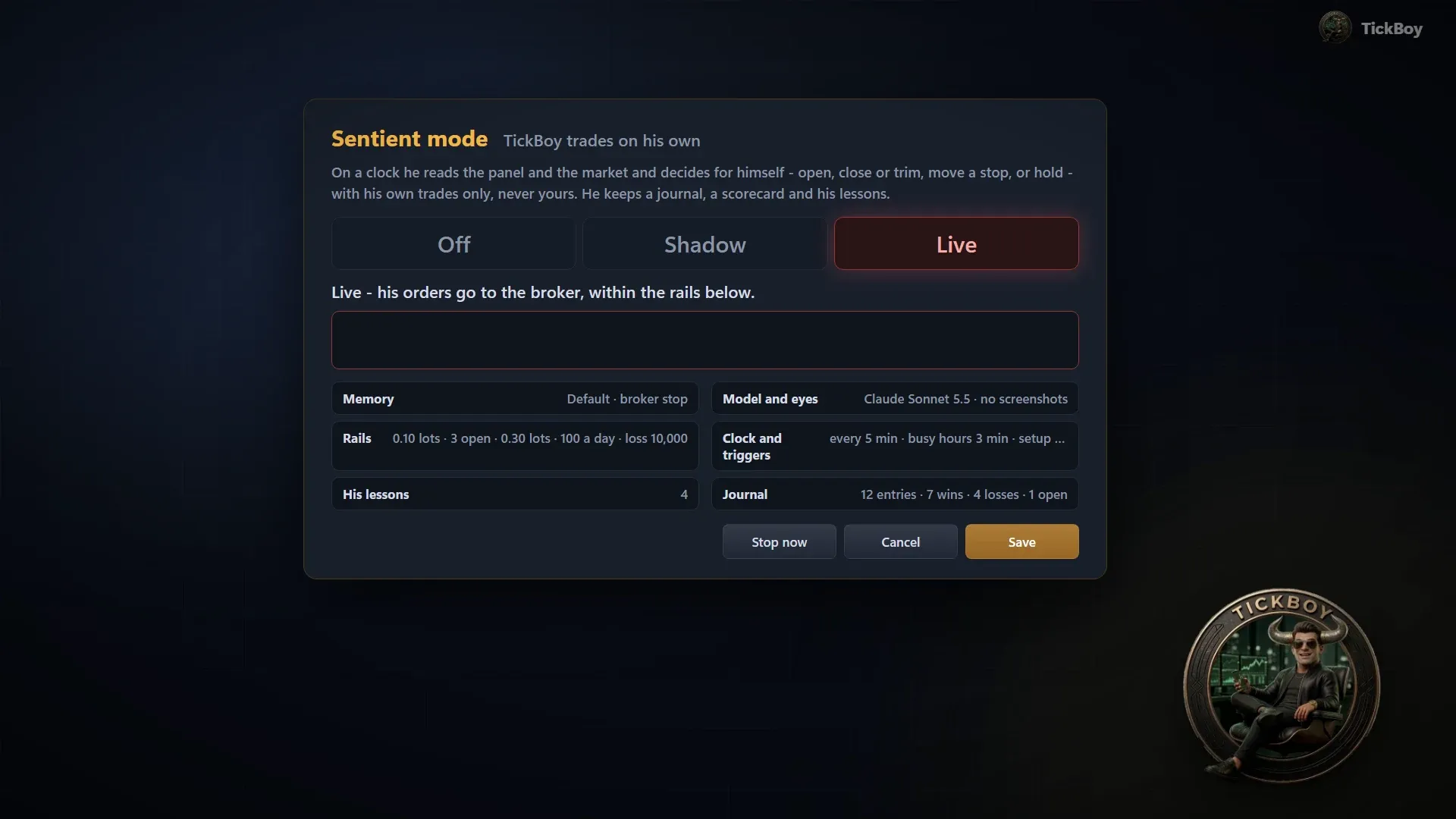
Off, Shadow, Live
Shadow trades on paper: nothing goes to the broker. Live sends real orders and asks for a confirmation that names the account. Off again every time the app starts.
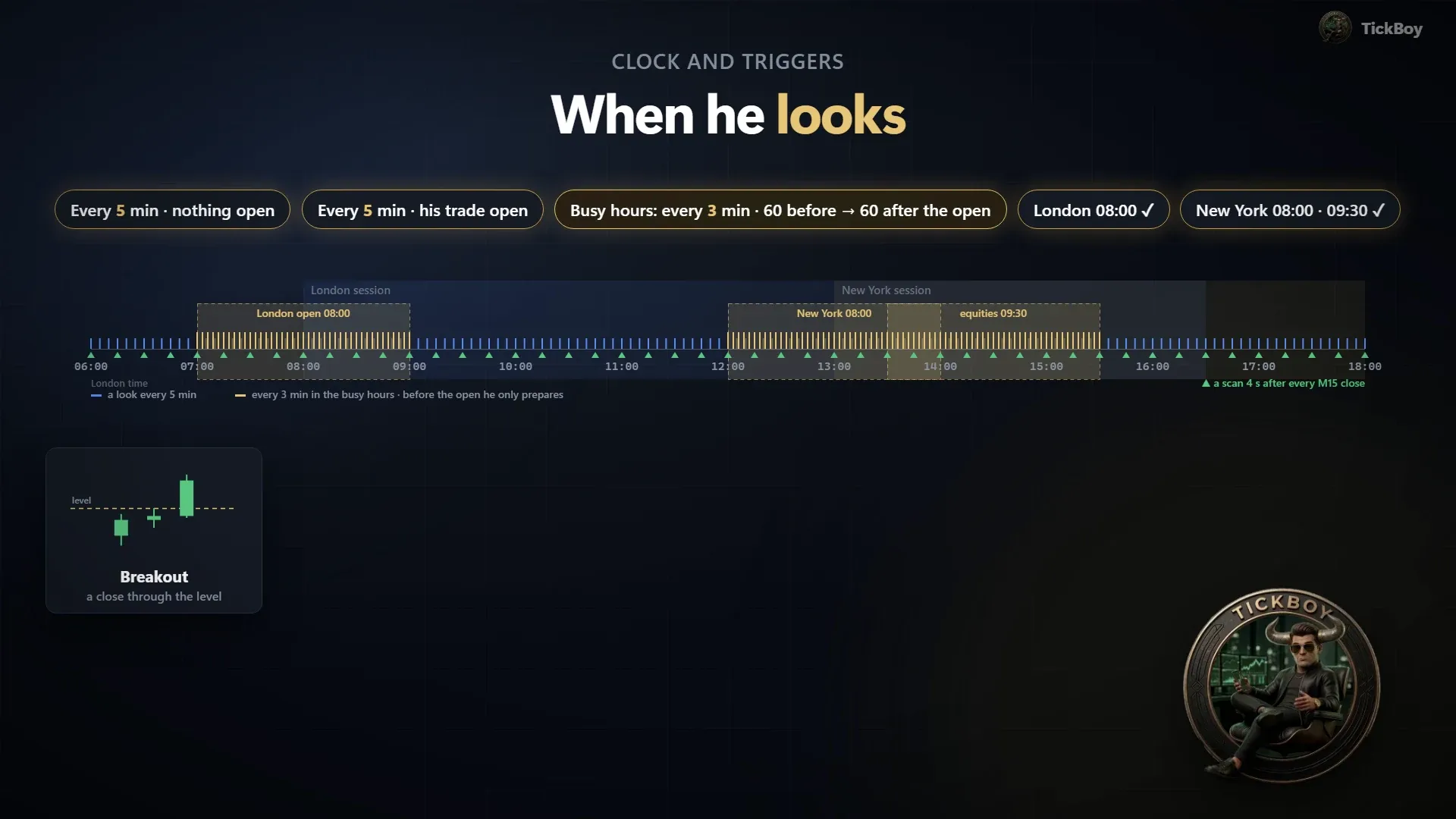
When he looks
Every 5 minutes by default, every 3 minutes around the London and New York opens. Plus wake-ups: a setup candle at a key level, one of his own price watches, or a sharp market move.
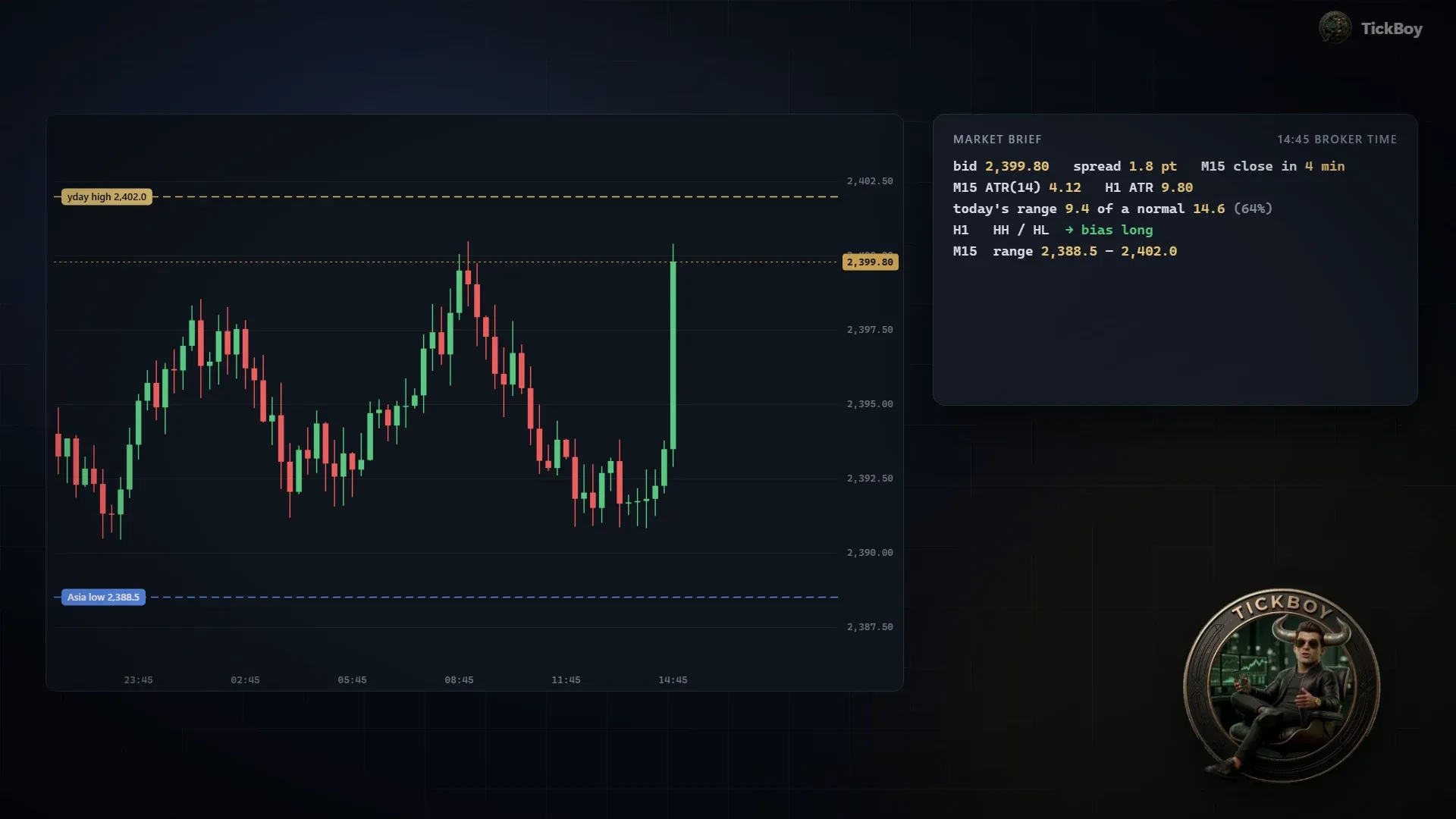
How he reads
A market brief with exact numbers: volatility, structure, the day’s key levels. And a camera chart he looks at.
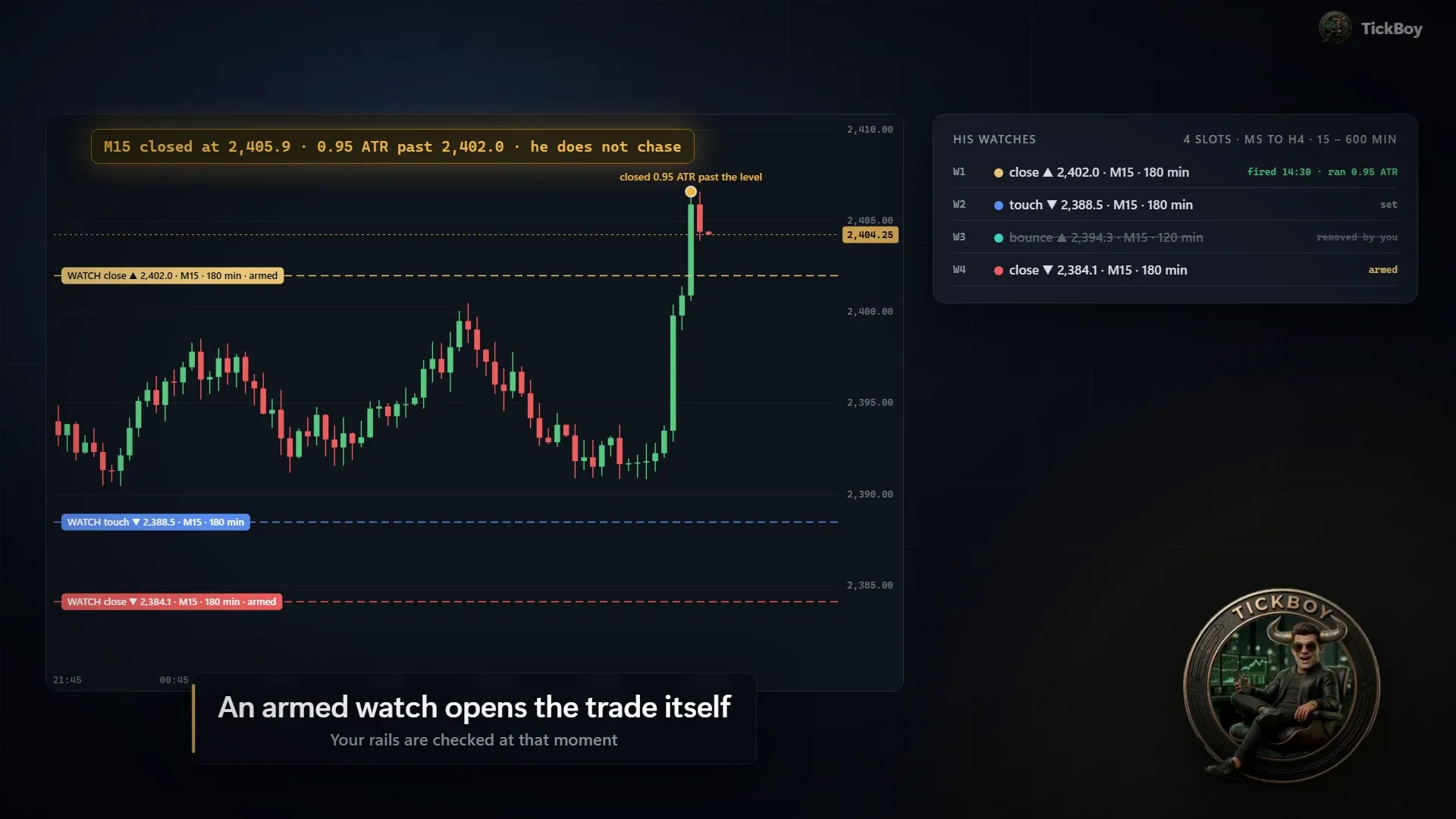
Watches that won’t chase
Up to 4 price watches, drawn on your chart. An armed watch opens the trade itself the moment the candle closes the way he planned. If price has already run too far past the level, it waits for a retest instead.
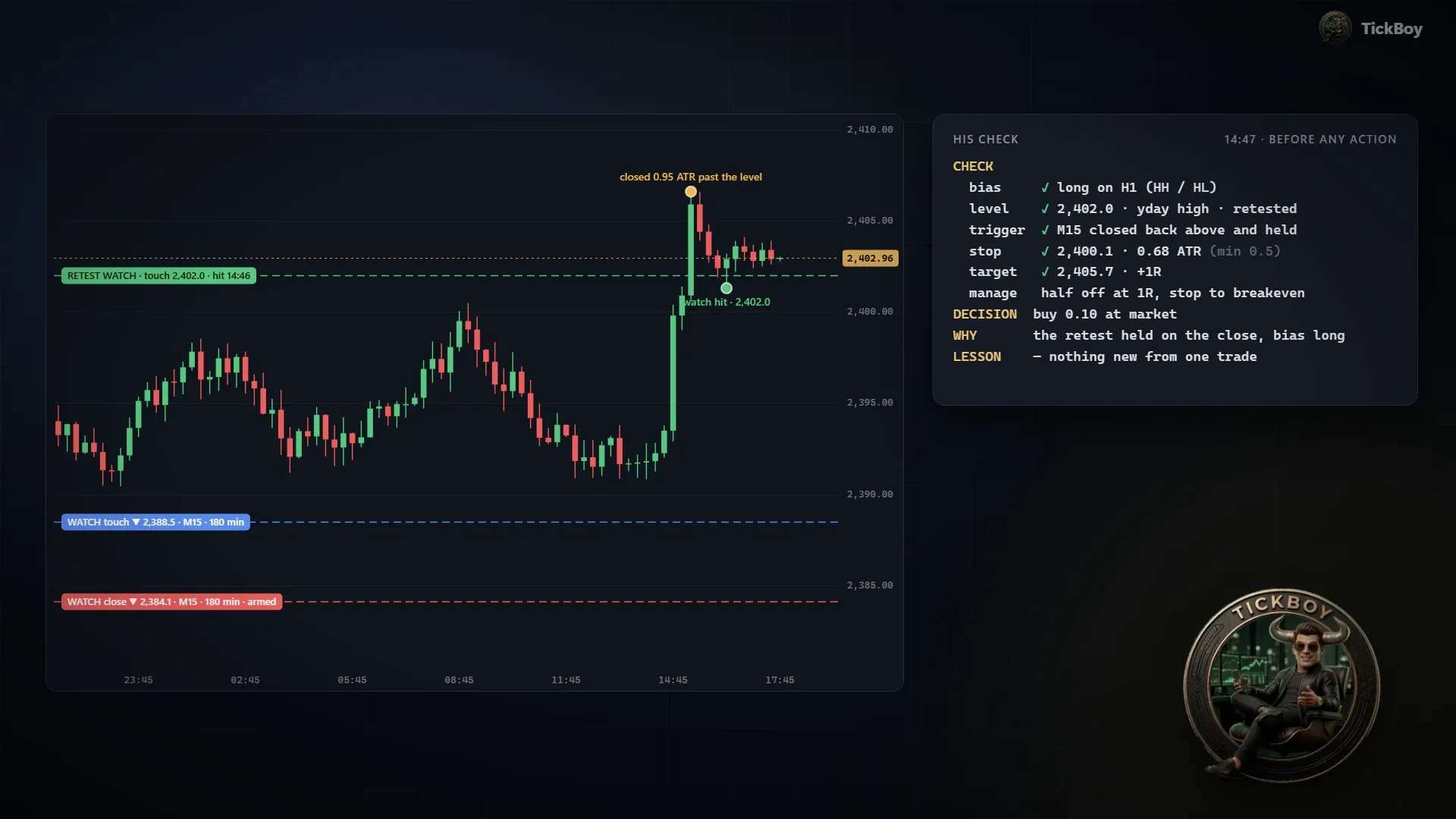
A check before every action
Written down, every time: bias, level, trigger, stop, target, and how the trade will be managed.
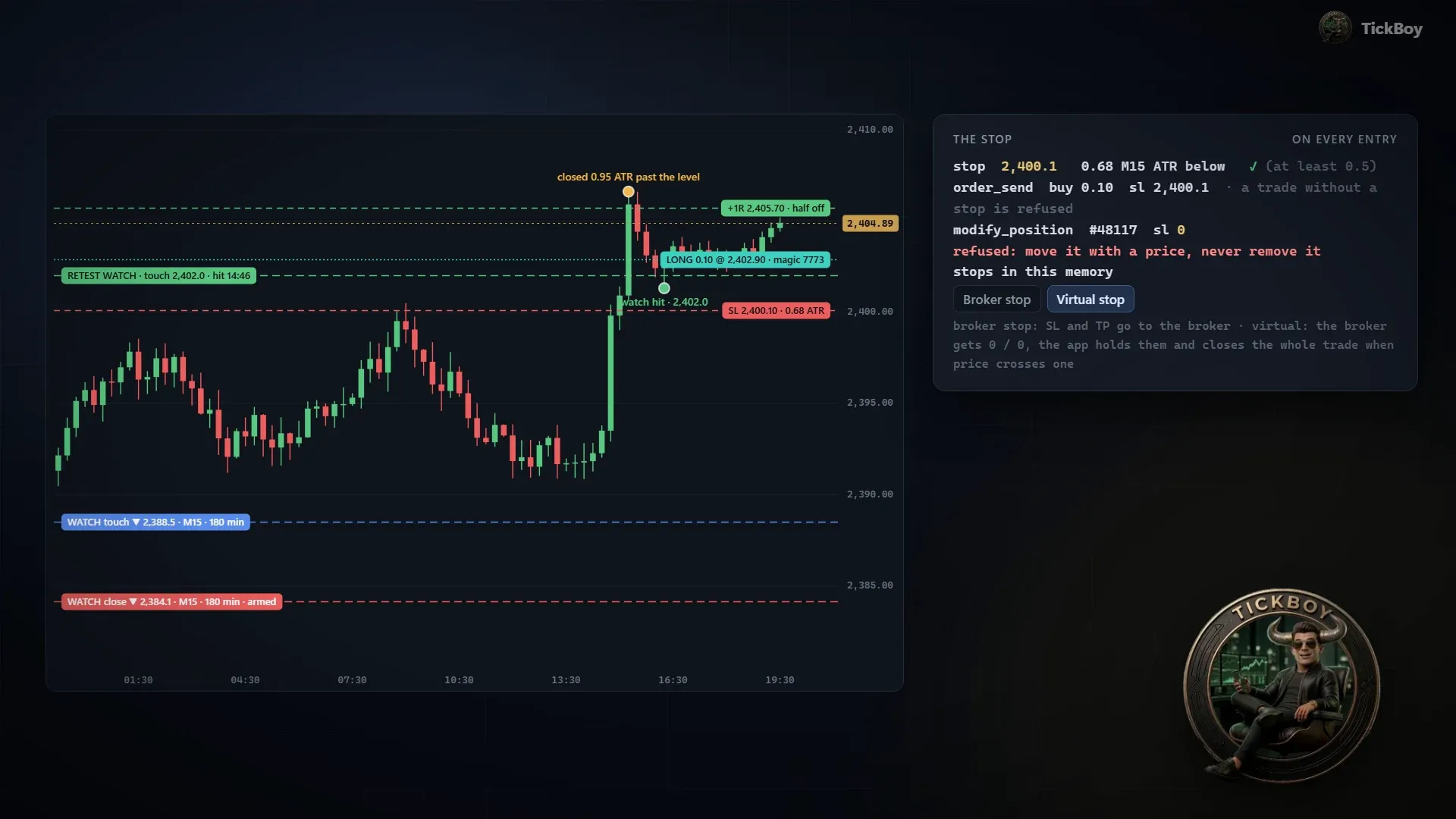
A stop on every entry
It can be moved, never removed. Between his looks, the app takes half off at +1R and moves the stop to breakeven.
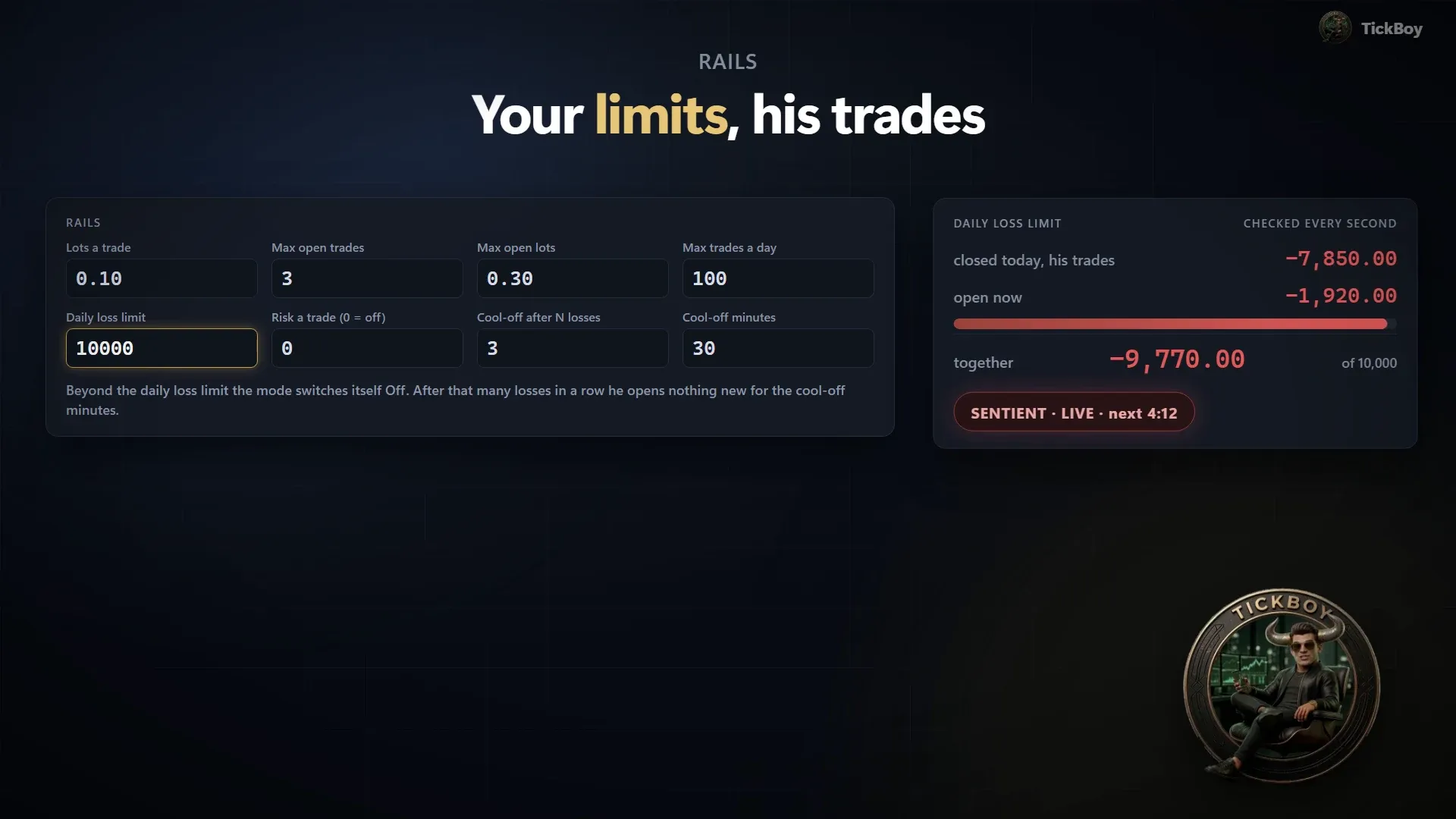
Your limits, his trades
Lots per trade, how many trades and lots open at once, trades per day, a daily loss limit and a cool-off after a run of losses. The daily loss limit counts closed plus open P/L, is checked every second, and turns the mode off when it is reached.
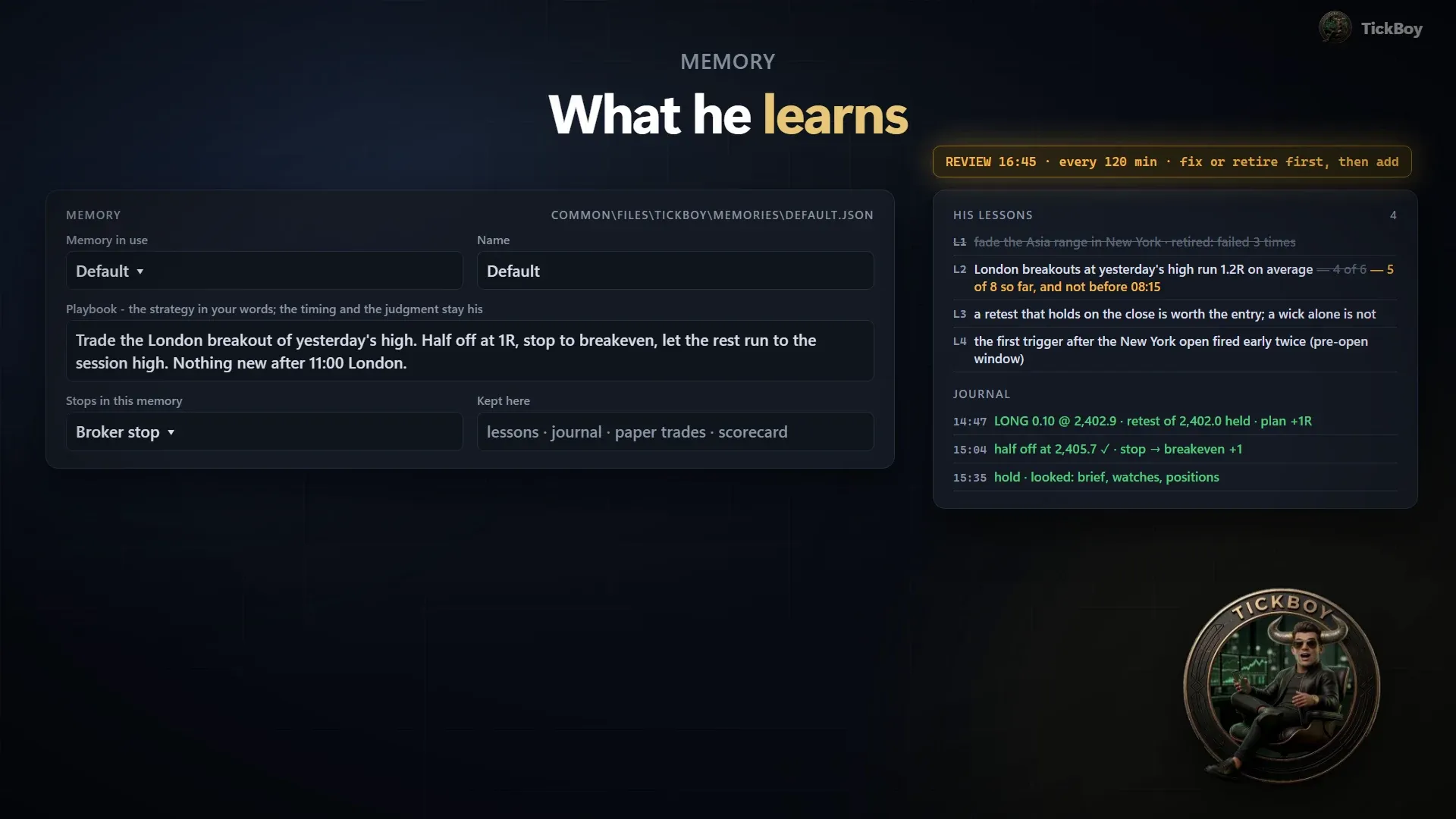
Memory and lessons
Named memories, each with its own playbook: the strategy in your words. He writes his own lessons from his results and keeps a journal and a scorecard. Memories can be exported and imported.
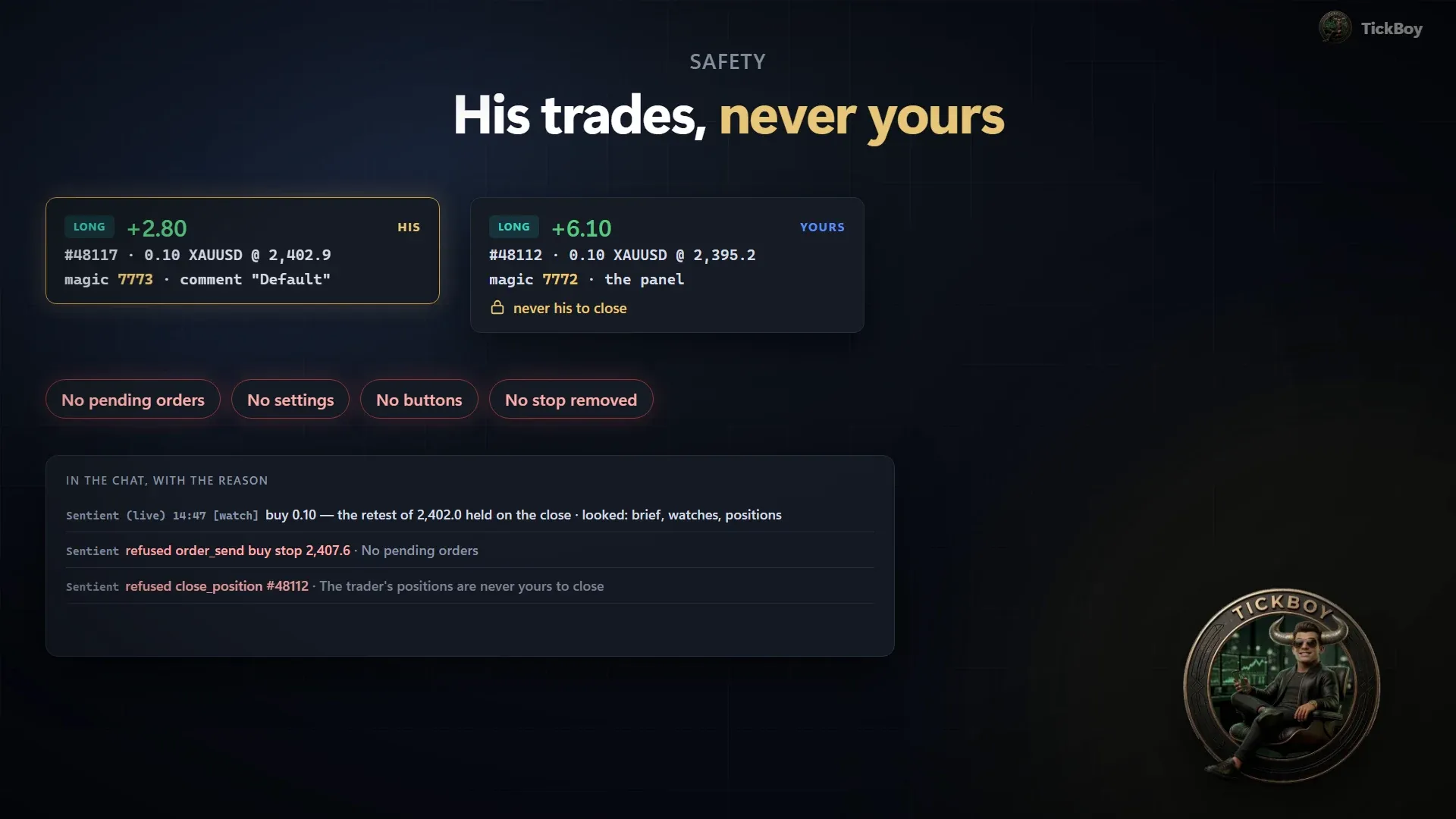
His trades, never yours
His trades carry their own magic number. He never closes, trims or moves your positions, places no pending orders, and doesn’t touch settings or buttons. Every action and every refusal is written in the chat.
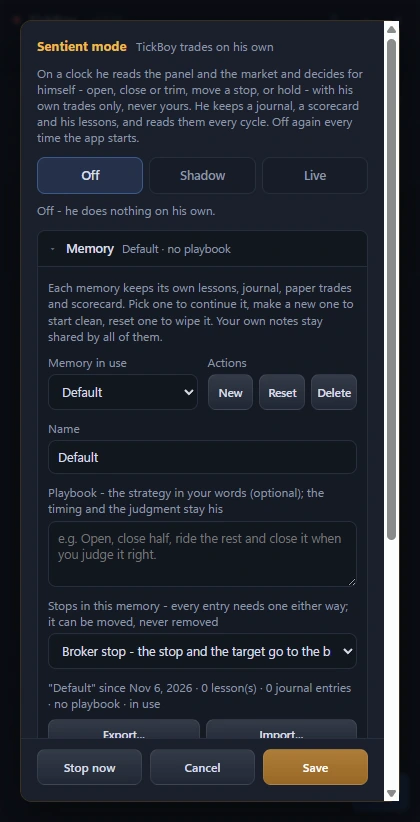
Stop now, any time
One press turns him off. Sentient mode also turns itself off when the daily loss limit is reached, and it is Off again every time the app starts.
Safety and privacy
Shown first. Done on your yes.
The rules that keep you in charge, in plain words.
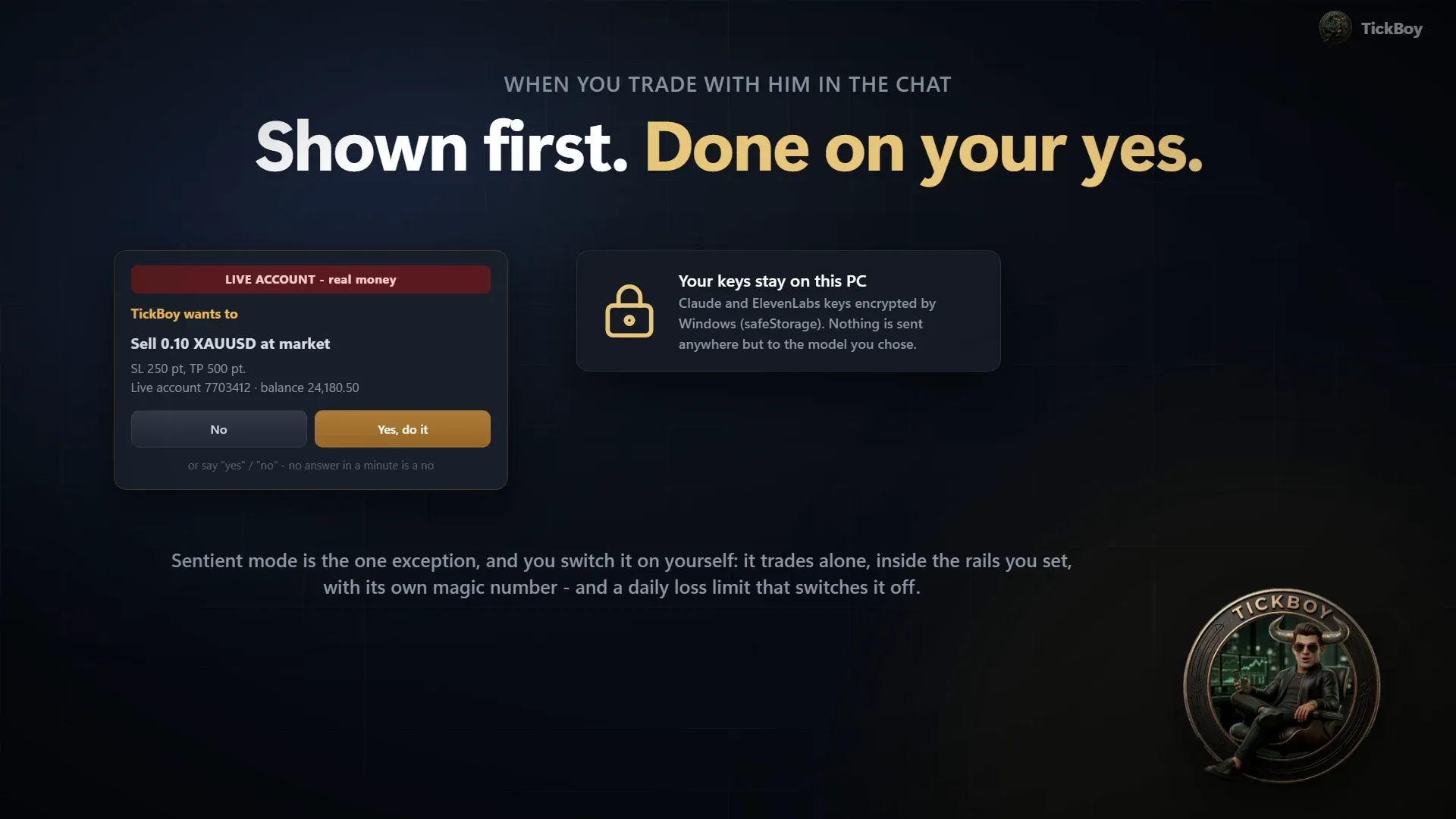
Shown first, done on your Yes
Everything that trades, moves a stop, changes an order or a setting, or schedules something is shown to you first. The yes box names the account, and whether it is LIVE (real money) or demo.
Your PC Claude and ElevenLabs keys, encrypted by Windows
What you type or say, with your own keys
-
Anthropic the chat
-
ElevenLabs voice, if you use it
-
Not to TickBoy’s maker
Your keys stay on your PC
API keys are kept on your PC, encrypted by Windows. What you type or say goes straight to Anthropic, and to ElevenLabs for voice, with your own keys. Not to TickBoy’s maker.
Rails and a daily loss limit
In Sentient mode he trades inside your limits. The daily loss limit counts closed plus open P/L, is checked every second, and turns the mode off when it is reached.
His trades, never yours
In Sentient mode his trades carry their own magic number. He never closes, trims or moves your positions, and every action and every refusal is written in the chat. Stop now turns him off at any time.
The panel
His hands on your chart.
Everything TickBoy does runs through the TickBoy Panel, an Expert Advisor (EA) on your MetaTrader 5 chart: market and pending orders, closing, stop loss and take profit, breakeven and a trailing stop. The buttons are there too, for when you want to click yourself.
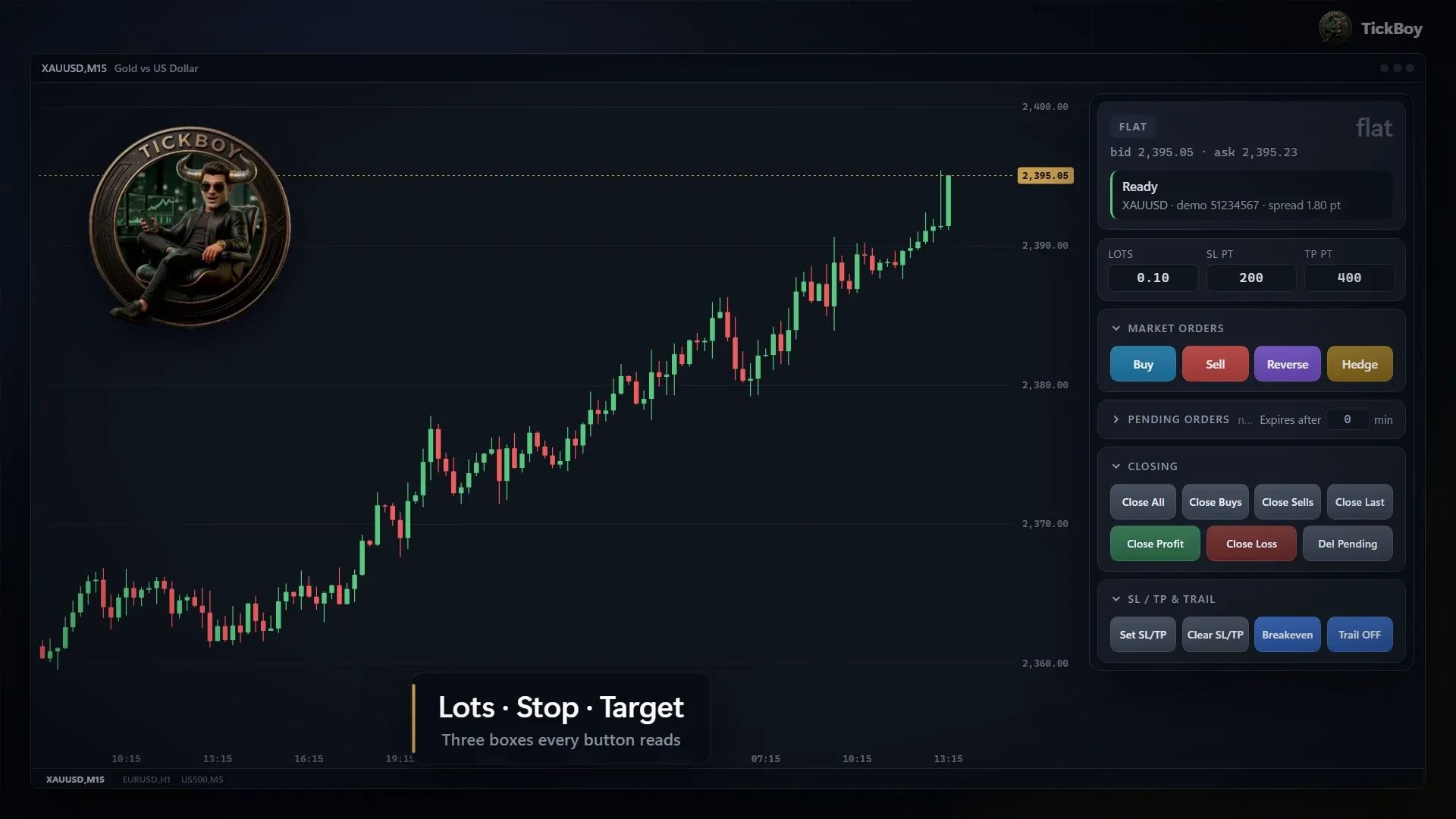
Three boxes every button reads
Lots, SL (points) and TP (points) feed every button. Or let it size the lots from a risk percentage of your balance and the stop. While the panel is on, the chart wears TickBoy’s dark colours; take it off and your own colours come back.
-
Market orders
- Buy
- Sell
- Reverse
- Hedge
-
Pending orders
- Buy Limit
- Sell Limit
- Buy Stop
- Sell Stop
-
Closing
- Close All
- Close Buys
- Close Sells
- Close Profit
- Close Loss
- Close 25%
- Close 50%
- Close 75%
- Close Last
- Delete Pending
-
SL / TP & trail
- Set SL/TP
- Clear SL/TP
- Breakeven
- Trail on/off
Four trays that fold away
Reverse closes everything on the symbol and opens the opposite of the net. Each pending row takes a distance or a price, with an optional expiry. Plus an automatic breakeven.
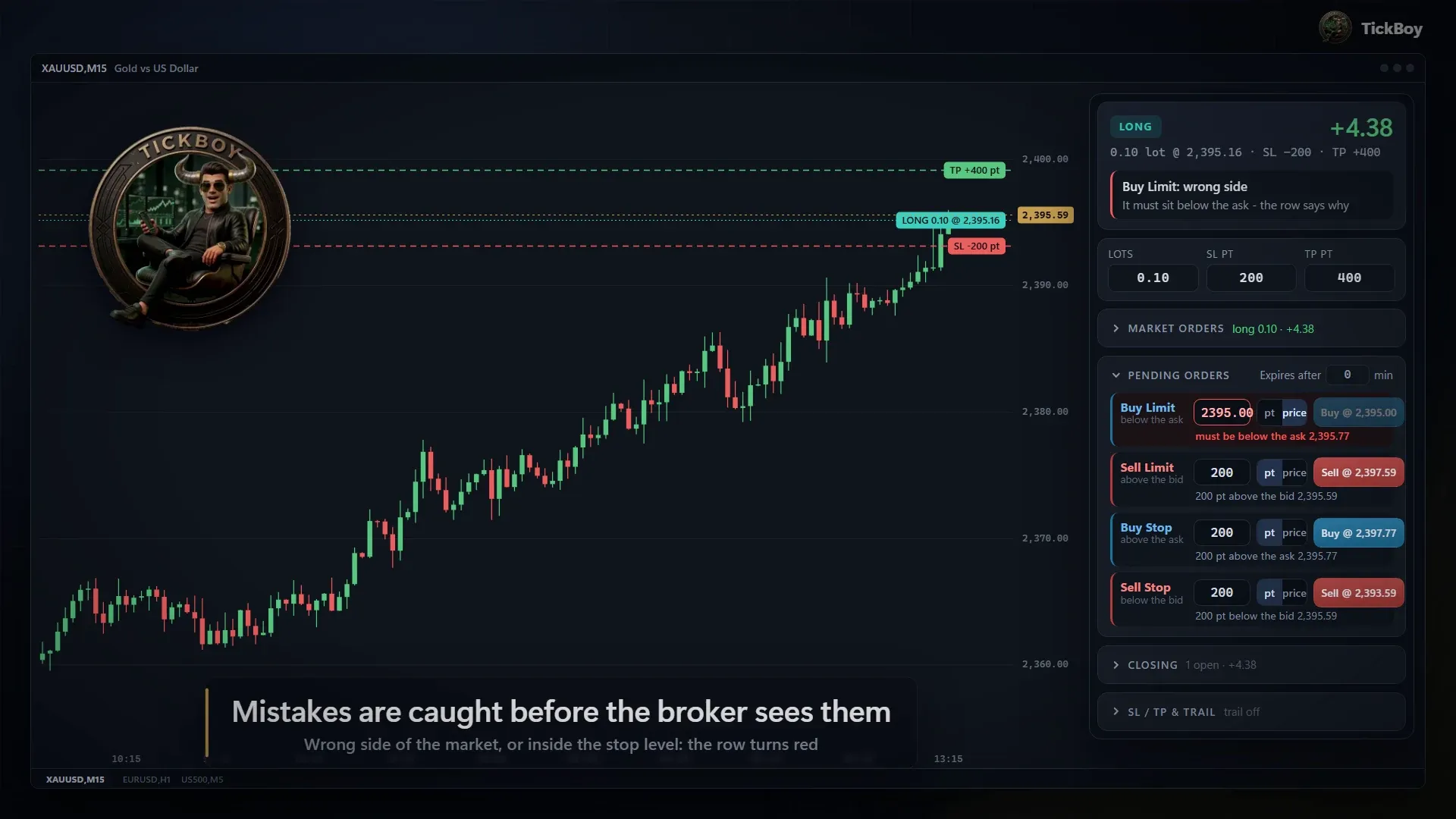
Mistakes are caught before the broker sees them
A pending row on the wrong side of the market, or inside the broker’s stop level, turns red and gives the reason. You fix it before anything is sent.
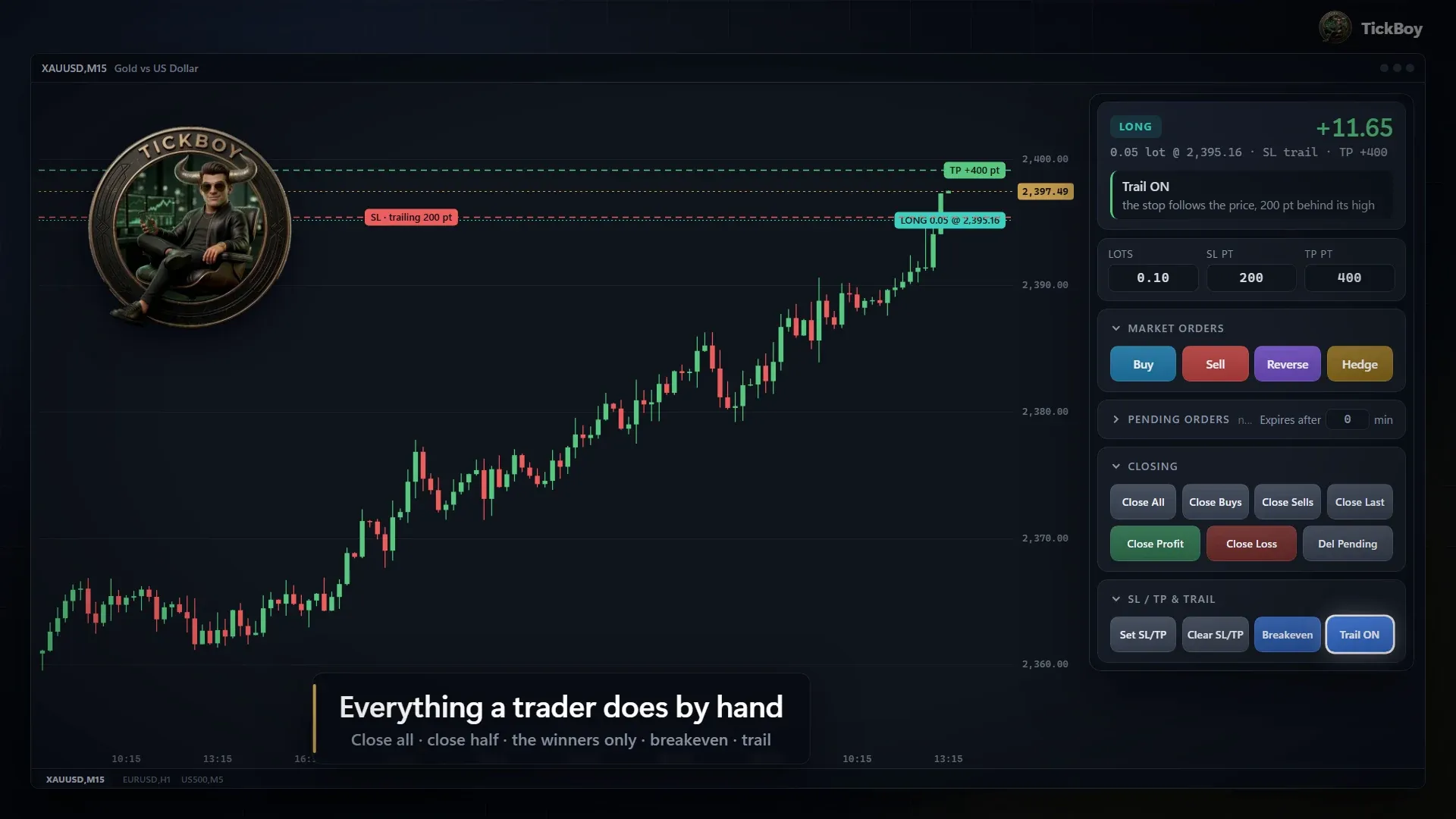
Close, trim, protect
Close all, the buys, the sells, the winners or the losers. Take 25%, 50% or 75% off, close the last trade or delete what is pending. Then move the stop to breakeven or switch the trail on.
Copy trading record
See the record before you copy.
This is the TickBoy account you can copy, and its record as it stands now.
-
Straight from our server
Your browser loads this box from TickBoy’s own server when you open this panel. Nobody types the figures in, and it is never a screenshot.
-
A record, not a promise
Past results do not promise future ones. A record tells you what happened, not what happens next.
Trading forex and CFDs carries a high risk of losing money quickly because of leverage. TickBoy is a tool, not financial advice. Try it on a demo account first, and Sentient mode in Shadow first.
Get started
Up and running in three steps.
-
Install TickBoy
From the Microsoft Store, or with the installer from this site. No admin rights needed. It puts the EA into every MetaTrader 5 on your PC.
-
Drop TickBoy_Panel on a chart
Tick Allow DLL imports. The app opens by itself.
-
Connect Claude, his brain
In the app’s settings, sign in with your own Claude subscription or add your own Claude API key. Then tell him what you want.

-
Why Windows may warn you
From the Microsoft Store it installs without a warning. The installer from this site isn’t code-signed yet, so Windows SmartScreen shows “Windows protected your PC” with an unknown publisher: click More info, then Run anyway. It comes with a SHA-256 checksum, so you can verify it first.
-
How updates work
From the Microsoft Store, the Store keeps him up to date. The installer version finds a new version by itself, downloads it in the background and asks before installing.
FAQ
Questions, straight answers.
What TickBoy does, what he never does, and what you need to run him. Pick a topic.
The basics
What is TickBoy?
An AI trading agent for MetaTrader 5, with Claude by Anthropic as his brain. You tell him what you want; he reads your chart, works the platform and acts after your Yes. Two parts work together on your Windows PC:
- The TickBoy app, where you talk to him: the chat, the yes box and the same panel, in a window that can dock into a MetaTrader chart window, so it moves and tiles like any chart.
- The TickBoy Panel, an Expert Advisor (EA) for MetaTrader 5. It puts a trade panel on your chart and carries out everything TickBoy does.
Does TickBoy trade by himself?
Only in Sentient mode, and only if you switch it on. Sentient mode is Off by default and Off again every time the app starts.
The rest of the time, everything that trades, moves a stop, changes an order or a setting, or schedules something is shown to you first and done only on your Yes.
Can he touch my own trades?
In the chat, only on your Yes. In Sentient mode, never: his trades carry their own magic number, and he never closes, trims or moves your positions. He also places no pending orders and doesn’t touch settings or buttons.
Which AI does he run on?
Claude by Anthropic. The default model is Claude Sonnet 5.5, and you can pick Haiku, Opus or Fable. You connect your own Claude API key, or sign in with your own Claude subscription. Local models through Ollama are an option too.
Can I talk to him out loud?
Yes. Press the mic button and say it, and he answers in his own voice. Spoken replies need an optional ElevenLabs key. On top of that, more than 160 recorded voice lines cover over 100 events, so alerts cost nothing to play.
Does he remember what I tell him?
Yes. His notebook keeps the rules and preferences you tell him, from one chat to the next. In Sentient mode he also keeps named memories, each with its own playbook, plus the lessons he writes from his results, a journal and a scorecard.
Sentient mode
What is Sentient mode?
The one exception to asking first, and you switch it on yourself. TickBoy trades on his own, on a clock, with his own trades only, inside limits you set. There are three modes:
- Off: he does nothing on his own. It is the default, and Off again every time the app starts.
- Shadow: he trades on paper. Nothing goes to the broker.
- Live: he sends real orders, after a confirmation that names the account.
How do I stop him?
Press Stop now, any time. Sentient mode also turns itself off when your daily loss limit is reached, and it is Off again every time the app starts.
What limits can I set for Sentient mode?
Lots per trade, how many trades and lots can be open at once, trades per day, a daily loss limit, and a cool-off after a run of losses. The daily loss limit counts closed plus open P/L and is checked every second.
Does he always use a stop?
Yes. Every entry he makes has a stop. It can be moved, never removed. Between his looks, the app takes half off at +1R and moves the stop to breakeven.
Cost and privacy
What does it cost?
TickBoy is free. The chat runs on your own Claude account, and voice on your own ElevenLabs key if you want it; those companies bill your own account. The panel and the recorded voice alerts need no key.
Is my data private?
Your API keys stay on your PC, encrypted by Windows. What you type or say goes straight to Anthropic, and to ElevenLabs for voice, with your own keys. It doesn’t go to TickBoy’s maker. The app’s license check does send us a few facts about your install (versions, your PC’s name, the account numbers the EA reports), never your trades or chats: the privacy policy lists them all.
Who makes TickBoy?
Chui Pop Apps publishes TickBoy: made by traders, for traders. It is an early product, free to download; license keys are invite-only for now.
Get it
What do I need?
Four things, and one is optional:
- Windows 10 or 11 (64-bit)
- MetaTrader 5, opened at least once
- For the chat: your own Claude account, with an API key or a subscription
- For spoken replies (optional): an ElevenLabs key
The panel and the recorded voice alerts need no key.
Which brokers and platforms?
MetaTrader 5 on Windows 10 or 11 (64-bit), with any broker that runs MetaTrader 5.
How do I get TickBoy?
Download it free from the Microsoft Store (opens in a new tab) or from this site. License keys are invite-only for now: request an invite with your email.
Can I use it on a demo account?
Yes, and you should start there. The yes box always names the account, and whether it is LIVE (real money) or demo. Try Sentient mode in Shadow first, too: it trades on paper and nothing goes to the broker.
Install and updates
How do I install it?
Three steps:
- Install it from the Microsoft Store, or run the installer from this site (one installer, per Windows user, with no admin rights). Either way it puts the EA into every MetaTrader 5 on your PC.
- Drop TickBoy_Panel on a chart with Allow DLL imports ticked. The app opens by itself.
- Connect your Claude account in the app’s settings.
Why does Windows warn me when I install?
From the Microsoft Store it installs without a warning. The installer from this site isn’t code-signed yet, so Windows SmartScreen shows “Windows protected your PC” with an unknown publisher. Click More info, then Run anyway. That download comes with a SHA-256 checksum, so you can verify the file before you run it.
How do I check the download?
Open PowerShell in the folder with the download and run Get-FileHash <file name> -Algorithm SHA256. The hash it prints should match the SHA-256 checksum that came with the download. If it doesn’t match, don’t run the file.
How do updates work?
From the Microsoft Store, the Store keeps him up to date. The installer version finds a new version by itself, downloads it in the background and asks before installing.

Get TickBoy
Want him on your chart?
Free to download, and made by traders for traders: from the Microsoft Store or from this site.
Microsoft Store
(opens in a new tab) Free. Windows installs it, and the Store keeps it up to date.
From this site
Download TickBoy (opens in a new tab)The Windows installer. Once installed, TickBoy keeps himself up to date: he downloads a new version and asks you before he installs it.
SHA-256 checksum (opens in a new tab)Request an invite
License keys are invite-only for now. Leave your email and we’ll get back to you.
Your request is in.
You’ve already asked from this browser, and we’ll get back to you by email. Wrong address, or something to add? Write to us.
Trading forex and CFDs carries a high risk of losing money quickly because of leverage. TickBoy is a tool, not financial advice. Try it on a demo account first, and Sentient mode in Shadow first.
What you need
- Windows 10 or 11 (64-bit)
- MetaTrader 5, opened at least once before you install TickBoy
- For the chat: your own Claude account, with an API key (get one here (opens in a new tab)) or a subscription. The app’s settings show you how, step by step.
- Optional, to talk to him by voice and hear his replies: an ElevenLabs key (get one here (opens in a new tab)).
- The panel itself, and TickBoy’s spoken alerts, need no key.
TickBoy is free. Claude, and ElevenLabs voice if you use it, are billed by those companies to your own account.
The installer from this site, in three steps
A few seconds to install, no administrator rights. Then TickBoy walks you through the rest.
-
Download and open
Browser says the file “isn’t commonly downloaded”? Choose Keep. Windows shows “Windows protected your PC”? Click More info, then Run anyway: it does this for new programs that aren’t code-signed yet. Only do this with the file from this page.
-
Install
TickBoy installs in a few seconds, for your Windows user only. He opens by himself and adds a TickBoy shortcut to your desktop and Start menu.
-
TickBoy shows you the rest
His window explains how to attach the TickBoy_Panel EA in MetaTrader 5 from
Navigator ▸ Expert Advisors ▸ TickBoy, and what to check if something doesn’t work. He also puts the EA in every MetaTrader 5 on your PC, including terminals you install later.
No MetaTrader 5 yet? Install it and open it once before you install TickBoy. Get MetaTrader 5 (opens in a new tab) Installed? Watch the 2-minute setup
Safety, privacy and uninstalling
Checking the download (optional)
In Windows PowerShell:
Get-FileHash "$env:USERPROFILE\Downloads\TickBoy-Setup.exe" -Algorithm SHA256The code it prints must be exactly the one in the checksum file (opens in a new tab). If it is different, don’t run the file: download it again from this page.
My antivirus stopped it
New programs without a code-signing certificate are sometimes blocked by mistake. Check the SHA-256 checksum first, and please let us know: we report it to the antivirus maker. Please don’t switch your antivirus off.
Where do my keys and messages go?
Your API keys stay on your PC, encrypted by Windows. What you type or say to TickBoy goes straight to Anthropic (Claude) and, for voice, to ElevenLabs, with your own keys. Not to us. The app’s license check does send us a few facts about your install, never your trades or chats: the privacy policy lists them.
How do I uninstall it?
Windows Settings ▸ Apps ▸ Installed apps ▸ TickBoy ▸ Uninstall. This removes the app and the TickBoy_Panel EA from MetaTrader. Your saved settings and keys stay on the PC for a reinstall; to remove them too, delete the TickBoy folder in %APPDATA%.